
The 26NTC conference platform is your central hub for the conference experience. This is where you’ll build your personal agenda, access sessions, connect with other attendees, and explore vendors’ tools and products.
The platform is available in two formats:
- Web platform (recommended for virtual attendees)
- Mobile app (iOS and Android)
Use your NTC-registered email address to sign in on either platform.
Access the platform
Sign in

- Sign in to the platform with your NTC-registered email address.
- Check your email for a magic link to enter the platform.
Update your profile
Your profile helps other attendees connect with you. Take a few minutes to complete it, including your privacy and visibility settings.
Your profile is shared across both formats. You can update it in either the web platform or the mobile app.
On the web platform
- Click the circle in the top-right corner with your initials.
- Select Edit Profile.
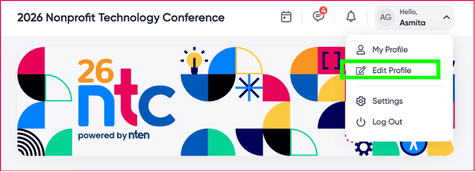
- Add a profile photo, and fill in the other fields under 'Basic Information'.
- Go through the other tabs to set up your privacy and networking preferences. This determines how other attendees will see and contact you.

On the mobile app
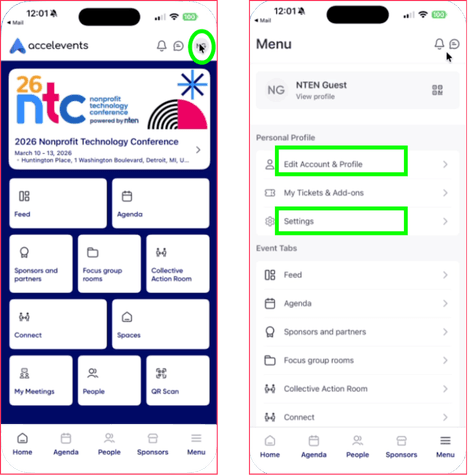
- Tap the circle on the top-right icon with your initials.
- To update your basic information like photo, description, social media and website links, go to Edit Account & Profile > Edit Profile.
- To update your privacy settings, go to Settings.
Engage with the conference
Now that you're all set up, begin exploring the conference virtually! Here's a few actions you can take:
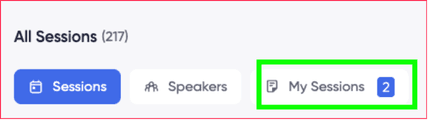
- Build your personal agenda by adding sessions to your schedule. View them on the 'My Sessions' tab.
- Introduce yourself in the chat on the right side of the Home page. Share who you are and what you hope to get out of the conference. Use the chat for transient messages, and reserve longer-lifespan messages for the main feed so attendees can respond to them!
- Make connections. Send connect requests to people engage with them. Once you're connected, you can DM each other or set up meetings. Manage your meetings by clicking the calendar icon in the top navigation bar, next to your account name.
- Set up product meetings. Browse the list of sponsors on the Sponsors and Partners. If enabled, you can schedule meetings with their representatives or chat with them.
- Explore special events to see additional opportunities to connect and participate.
